BoxLang 🚀 A New JVM Dynamic Language Learn More...
Studio Launch
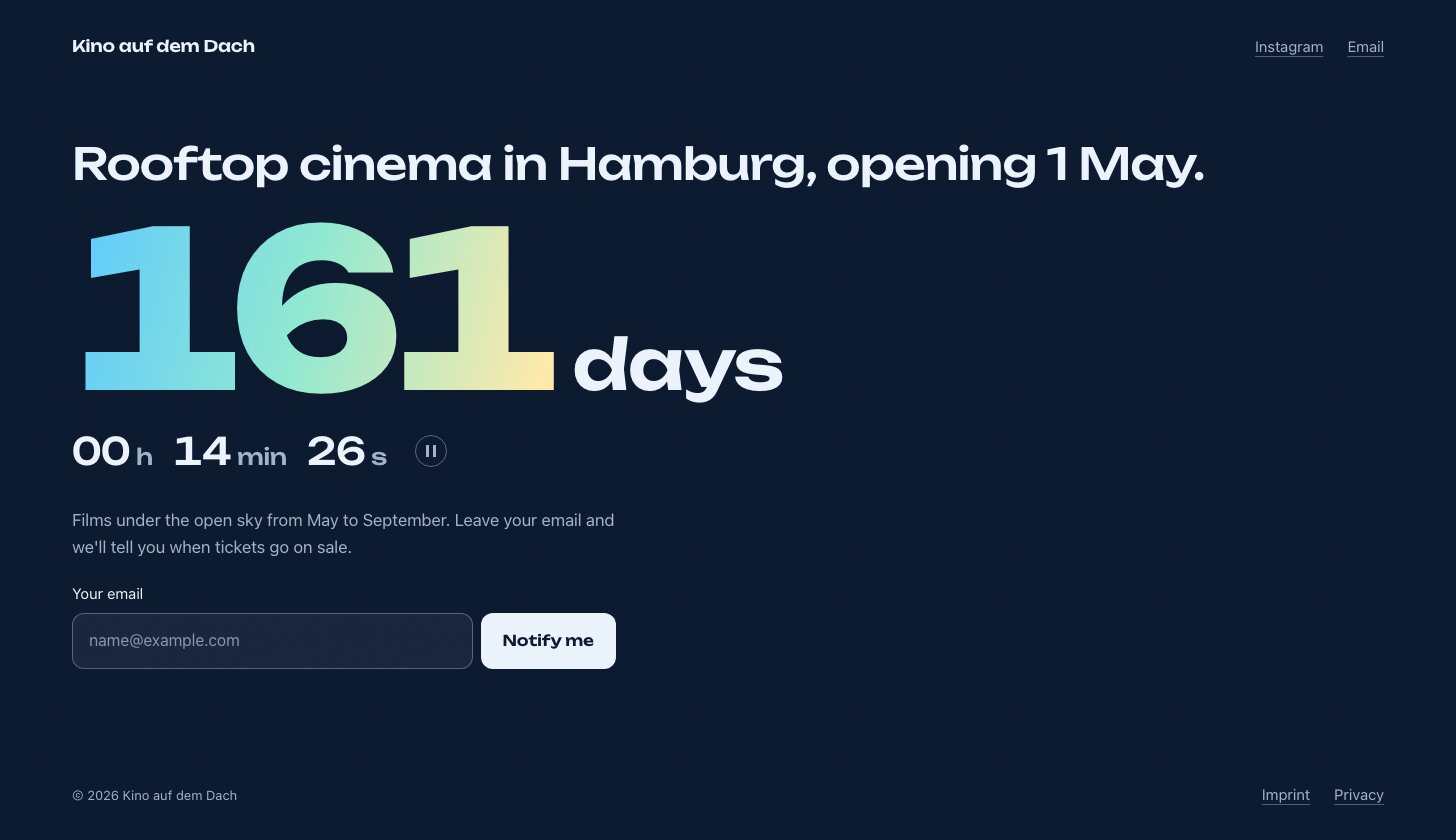
A coming-soon theme for ContentBox 7 and ContentBox Studio: one screen with a countdown to the opening, a headline, a short text and a newsletter signup. Text pages (imprint, privacy) and the 404 come in the same frame. Plain CSS and JavaScript, no build step, one self-hosted variable font.
Status: 0.1.0, the first version, on ForgeBox.
Aim: a minimal template without dependencies
Studio Launch is meant to stay small enough to read in one sitting and to run for years without updates. Changes should keep it that way:
- No frameworks or libraries: one stylesheet of plain CSS (about 780 lines), one script (about 90 lines), and a colour scheme of six colours in its own file. No Tailwind, Bootstrap, jQuery or npm packages.
- No build step: the files in the repository are the files the browser gets. Change them and reload; no Node.js, no compiling, on the server or anywhere else.
- No outside requests: the font is part of the theme; no CDN, no analytics, and the theme sets no cookies (the session cookie comes from ContentBox's server). The only address outside the site is your newsletter service, and only when a visitor sends the form.
- Works without JavaScript: the written date stands in for the countdown, and the signup is a plain HTML form.
- Nothing beyond ContentBox and ContentBox Studio: no other modules, no extra ColdBox setup.
Everything together (stylesheet, script and font) is under 200 KB.
Requirements
- ContentBox 7.
- ContentBox Studio for the coming-soon screen, which is a Studio block. Without Studio the theme still shows classic pages as text pages.
Installation
In the root of the ContentBox site:
box install studio-launch
It goes to
modules_app/contentbox-custom/_themes/studio-launch.
Without CommandBox, clone or unpack it there:
git clone https://github.com/akitogo/studio-launch.git modules_app/contentbox-custom/_themes/studio-launch
Keep the folder name studio-launch: ContentBox stores
the theme settings under it. Then:
- In ContentBox's admin, Look & Feel → Themes, Rebuild Registry, and activate Studio Launch for the site. Reinit the application once, so Studio finds the theme's blocks.
- In the theme's settings, choose a colour scheme, the language and the links (see Theme settings).
- In Studio, give the start page a Launch block (see below) and publish it.
- Create the imprint and privacy page, e.g. Imprint and
privacy with the slug
imprint-and-privacy: with Studio's Heading and Text blocks (give the two main headings the anchorsimprintandprivacy), or paste the sample text into the classic editor and replace it with your own. Then add the footer links.
The Launch block
| Field | |
|---|---|
| Layout | Big countdown: the days set large, the hours, minutes and seconds below. Name large, small countdown: the name across the screen, the headline and a one-line countdown beside the text and the signup |
| Name set large | Only in the second layout; empty means the site name |
| Headline | The page's h1, e.g.
"Rooftop cinema in Hamburg, opening 1 May." |
| Opening | Date and time the countdown runs to, as
2027-05-01 19:30 (or 2027-05-01 for midnight) |
| Time zone of the opening | e.g.
Europe/Berlin; empty means the server's time zone.
The countdown is right for visitors in every time zone |
| Date as written | Shown in place of the countdown when a browser runs no JavaScript; empty means written from the opening in the site's language ("1 May 2027", "1. Mai 2027") |
| Text once open | Takes the countdown's place when the time has come, e.g. "We're open." |
| Text | A few sentences beside or below the countdown |
| Newsletter signup | Shows the signup form, with the fields below |
The countdown runs in the visitor's browser. While its seconds run, a button pauses it (moving content needs one); the small countdown, and visitors who ask for reduced motion, get no seconds. In Studio's editor the block shows the numbers of the moment it was last rendered.
Signup
The form sends the address straight to your newsletter service, so the theme stores nothing and needs no JavaScript for it. Take the values from the signup form the service gives you to embed (Buttondown, Brevo, Mailchimp, Sendy, listmonk, ...):
| Field | From the service's form |
|---|---|
| Form address of your newsletter service | The
action of its <form>
|
| Name of the email field | The name of its
email <input>, e.g. email, or
EMAIL for Mailchimp |
| Hidden fields | Each <input
type="hidden"> with its name
and value, e.g. a list ID |
| Field label, Field example, Button | The words on the form |
| Thank-you line | Shown under the form when the service
sends visitors back with ?subscribed in the
address. Set the service's success page to your start page with
it, e.g. https://example.com/?subscribed
|
Until the form address and the field name are set, the form stays off and Studio's editor shows a note in its place. Mention the service in your privacy policy (the sample text has a paragraph for it).
Theme settings
| Setting | |
|---|---|
| Colour scheme | Ink (night blue, the figures lit from sky blue to moonlight), Ember (dark wine, orange to red to gold), Glacier (light, teal to blue) |
| Language | The pages' language code (html
lang), e.g. en or de. The
theme's own words (countdown units, skip link, 404 page,
maintenance) come in English and German; other languages get the
English ones |
| Links in the header | One link per line, label and
address separated by \|: Instagram \|
https://www.instagram.com/yourname, Email \| mailto:[email protected]
|
| Links in the footer | Same format, e.g. Imprint \|
/imprint-and-privacy#imprint and Privacy \| /imprint-and-privacy#privacy
|
The image shared on social media is the start page's featured image (ContentBox's own Open Graph tags).
What is in it
| Part | |
|---|---|
blocks/launch
| The coming-soon screen |
blocks/text, blocks/heading
| Replace Studio's core Text and Heading blocks (same fields; headings get an optional anchor) with the theme's text styles |
blocks/editor.css
| Studio's editor canvas: the page colours and font, the countdown as rendered, notes for missing settings |
blocks/_shared/words.cfm
| The theme's words in English and German |
layouts/pages.cfm
| The frame: site name and links, the page, copyright and links; one screen high |
views/
| Start page and text pages (page), 404
(notfound), maintenance mode, error, and a plain
blog (list, post, search) |
includes/css/schemes/
| The three colour schemes: six colours each, linked before the theme's stylesheet |
includes/css/launch.css, includes/js/launch.js
| Everything else; plain CSS and JavaScript |
includes/fonts/
| Unbounded (SIL Open Font License) |
To change a scheme's colours or add one, copy a file in
includes/css/schemes/ and add its name to the list in
layouts/pages.cfm and to the setting's options in
Theme.cfc. Changes inside the theme folder are
overwritten by an update, so keep a copy.
License
Apache License 2.0, see LICENSE. The font comes with its own license, see THIRD-PARTY.md.
Changelog
0.1.0 (2026-11-21)
First version.
- Coming-soon screen as a ContentBox Studio block (Launch): a countdown to the opening, a headline, a short text and a newsletter signup; two layouts (big countdown, or the name set large with a small countdown)
- Countdown in the visitor's browser, to a date and time in a given time zone; the written date without JavaScript, a text of your choice once the time has come; a pause button while the seconds run
- Signup form that posts straight to your newsletter service (Buttondown, Brevo, Mailchimp, Sendy, listmonk, ...),
with hidden fields and a thank-you line when the service sends visitors back with
?subscribed - Text pages (imprint, privacy) with the theme's own text and heading blocks (headings with anchors), or classic HTML
- 404, maintenance and error pages in the same frame
- Three colour schemes (Ink, Ember, Glacier), links in the header and footer, the theme's words in English and German
- Plain CSS and JavaScript, no build step; the Unbounded font self-hosted
-
Akitogo Team
- Published
-
0.1.0 is the latest of 1 release(s)
Published
- Published on {{ getFullDate("2026-11-21T11:35:31-06:00") }}
-
-
 Apache2
- akitogo/studio-launch

Use It
								$
									box install studio-launch
Collaborators 0
Stats
- {{ getFullDate("2026-11-21T11:35:30-06:00") }}
- {{ getFullDate("2026-11-21T11:35:31-06:00") }}
- 31
- 1